
How do I get the most from Revitive?
EMS Stimulation - for best results:
• Use Revitive foot-pads for at least 30 to 60 minutes each day, 7 days a week and use the large Revitive Arthritis Pads on your affected leg (knee) once a day for 20 minutes, 5 days a week.
• It is important to use Revitive at a high enough intensity to give you a strong comfortable muscle contraction. Most people achieve a strong muscle contraction over intensity level 40 (intensity range 1-99).
• It can take up to 12 weeks to help reduce symptoms associated with arthritis.Do not use Revitive, using EMS stimulation, for more than 6 sessions of 30 minutes (or the equivalent) per day.
TENS stimulation
For TENS Stimulation, through the smaller Revitive Body Pads, use as and when required, for 20-30 minutes each session.
a Remove all parts from the box:
• Revitive Arthritis-Knee device
• AC/DC power adaptor
• Small Electrode Body Pads
• Electrode cord x2
• Large Electrode Arthritis Pads
• Remote control
• AAA batteries x 2
See What is inside the Box? on pages 4-6 to help identify the parts.
b Locate the remote control and insert the batteries.
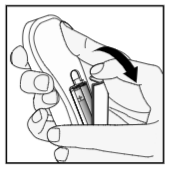
• The IsoRocker allows Revitive to rock while stimulating your legs & feet.
• Revitive will begin rocking on the IsoRocker once muscle contractions are strong enough.
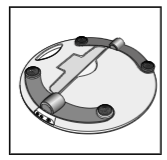
• The IsoRocker feature can be disabled, by ‘opening’ the IsoRocker Disabler. Revitive will then be static and it will not rock during use.
b If you want to use the IsoRocker, leave the IsoRocker Disabler in place (ie flat) on the of the device, as shown.
c If you do not want to use the IsoRocker
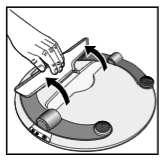
• Open the IsoRocker Disabler on the bottom of Revitive.

• Pull the IsoRocker Disabler back until it clicks open, as shown.
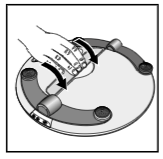
• To re-enable the IsoRocker, pull the IsoRocker Disabler and press into place on the bottom of the device (ie flat).
Battery power option
If you want to use the device without connecting it to an electrical socket, it can run from the battery.
When the device is running from the battery, an indicator will show the remaining battery level.
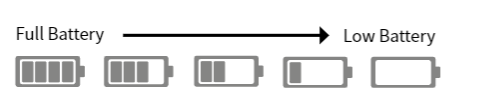
Follow Step 4 Using The Foot-pads or Step 5 Using the Electrode BodyPads to continue setting up REVITIVE.
When the battery drops to the low level, it will require recharging. See Step 6, Recharging Battery on page 34.
If you turn the device off and the low battery level indictor blinks for 10 seconds, the battery requires recharging.
Please note that if the battery runs out, the device can still be used,by connecting to an electrical socket.
Mains power option
If you want to use Revitive when the battery is low or to preserve the battery level Revitive can be used by connecting it to an electrical socket.
a Locate the AC/DC power adaptor.
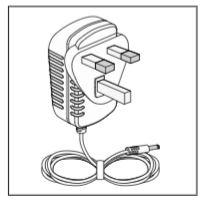
b Plug the small end of the power cord into the opening on the side of the Revitive.
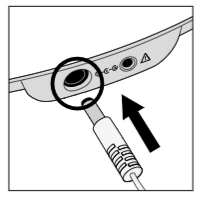
c Plug the power adaptor into the nearest electrical socket. This will start charging the (integrated) rechargeable battery.
Once you have connected Revitive to the electrical socket follow Step 4 Using the Foot-pads or Step 5 Using the Electrode Body Pads to continue setting up Revitive.
a It is important that you are hydrated. We recommend drinking a glass of water before using Revitive.
You may also apply a moisturiser to the soles of the feet to help hydrate the skin.
Hint: Applying a moisturiser to the soles of the feet before using Revitive can help improve the delivery of electrical stimulation.
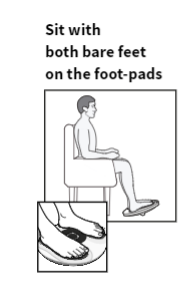
b Get into a comfortable seated position. For best results sit with your knees at a 90 degree angle (right angle).
c Place Revitive on the floor in front of you.
Revitive is designed to be used while seated. Never stand on the Revitive unit.
d Place both bare feet on the foot-pads. Make sure you remove all footwear, including socks/ stockings.
e Press the power button on the device or on the remote control to turn Revitive on. You will hear a beep and the display lights will light up. The time will read 30 minutes and Intensity will read 00.
To turn off Revitive at any time during operation, press the power button on the device or on the remote control.
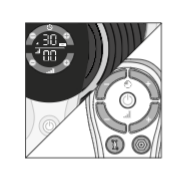
f Set the time for Revitive. The default time is 30 minutes. You can set the timer for up to 60 minutes. If you do not want to use the default time of 30 minutes, set the time for the number of minutes you want.
You can use the controls on the control panel or on the remote control.
Press the (+) Time Control to increase the time.
Press the (–) Time Control to decrease the time.
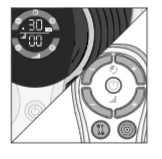
For best results use Revitive foot-pads for at least 30 to 60 minutes each day, seven days a week.
It is important to use Revitive at a high enough intensity to give you a strong comfortable muscle contraction. Most people achieve a strong muscle contraction over intensity level 40 (intensity range 1-99).
If you are diagnosed with a long term medical condition such as High Blood Pressure, High Cholesterol, Diabetes, Osteoarthrtis, Chronic Venous Insufficiency (CVI), Peripheral Arterial Disease (PAD), or COPD, we recommend a minimum of two (2) x 30 minute sessions per day. It can take up to 12 weeks to help reduce symptoms associated with these chronic conditions.
Do not use Revitive more than 6 sessions of 30 minutes (or the equivalent) per day. This may result in muscle fatigue.
g Press the (+) Intensity Control one time to start stimulation.
You can use the buttons on the control panel or remote control.
Press the (+) button to increase the level.
Press the (–) button to decrease the level.
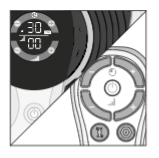
h Ensure you familiarise yourself with the feeling of Electrical Muscle Stimulation (EMS). Use on a low intensity for 30-60 minutes once per day for a few days.
Set the intensity at a level where you can feel the stimulation in your feet which creates a calf contraction. This will likely be less than intensity 40.
It is normal to feel tingling or varying sensations in your feet and calf muscles.
Revitive does not vibrate.
i After a few days of familiarisation, use a higher intensity that provides you with strong but comfortable calf muscle contractions.
Most people experience a strong contraction at intensity level 40 or over. You can set the intensity between 1-99.
Please note that the intensity required may vary from day to day.
If you feel pain or discomfort:
• Remove one or both feet from the foot-pads to stop the stimulation
• Lower the intensity of the foot-pads using the (–) Intensity Control on the control panel, or remote control, before replacing your feet on Revitive
j The Time Display will start to count down in minutes as Revitive cycles through its program.
k When Revitive times out, the Time Display reads 00 and you will hear three beeps.
l The Revitive switches itself off automatically.
Do not share with others.Revitive comes with one pair of reusable (up to 20-30 applications) Arthritis Pads that can be used to deliver Electrical Muscle Stimulation (EMS) to strengthen the muscles at the front of your thigh (quadriceps).
Strengthening your quadriceps muscles may help to support and stabilise the knee, reduce stress on the knee and relieve knee pain.
Revitive also comes with one pair of smaller reusable (up to 20-30 applications) Body Pads that can be used to deliver Transcutaneous Electrical Nerve Stimulation (TENS) to other parts of the body.
TENS provides stimulation of your nerves, which blocks the pain you experience in a particular area of your body. TENS can be used to provide pain relief to the areas shown on page 29. For instructions on how to use TENS, go to page 29.
Before using the Body Pads, select the area you wish to apply stimulation to and which stimulation mode you would like to use.
The positioning of the Electrode Pads will depend on which stimulation mode (EMS or TENS) you choose. The Electrode Pads cannot be used at the same time as the foot-pads. Using the Electrode Pads will automatically turn the foot-pads off.
Do not use Revitive more than 6 sessions of 30 minutes (or the equivalent) per day. This may result in muscle fatigue.
a Clean and dry the thigh where you will place the Arthritis Pads (see next page for positioning instructions).
b Make sure Revitive is switched off. If the control panel is still illuminated, press the power button and turn Revitive off.
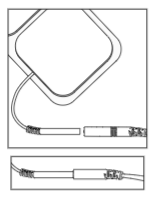
c Attach the ends of the Arthritis Pads to the Electrode cord.
Press connectors until there is no gap between them. Leaving a gap may cause discomfort.

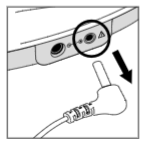
d Plug the other end of the Electrode cord into the opening on the side of Revitive.
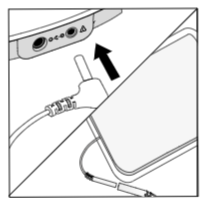
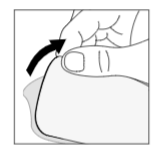
e Remove the plastic liner from the Arthritis Pads, by peeling it off carefully. Replace the Arthritis Pads onto the plastic liner after use.
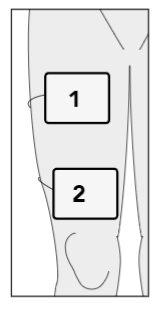
f Gently press one Arthritis Pad across your thigh (1), a few centimetres away from your groin area, with the adhesive side against the skin.
g Gently press second Arthritis Pad across your thigh (2), a few centimetres from the top of your kneecap, with the adhesive side against the skin.
The Arthritis Pads do not need to be lined up exactly with each other. They need to be in a position that is comfortable and that allows you to see your thigh muscles contract & relax.
Revitive Arthritis Pads are designed to be used whilst seated.
NB The Arthritis Pads are only suitable for use on the thigh muscle with the Revitive Arthritis-Knee device in EMS mode and will not be effective for any other areas of the body.
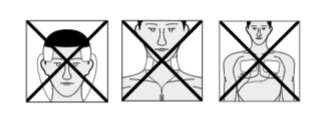
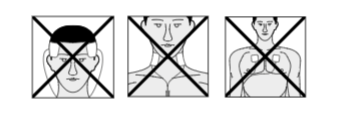
Do NOT use the Arthritis Pads on your head, face, neck or chest.
h Press the power button on the device or on the remote control to turn Revitive on.
You will hear a beep and the display lights will light up. The time will read 30 minutes, the Intensity will read 00 and the EMS symbol will be displayed.
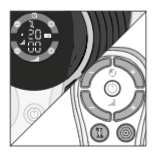
NB Revitive Electrode Pads will automatically provide stimulation in EMS mode.
See page 29 for instructions on how to use in TENS mode.
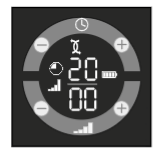
i Set the time for the number of minutes you want to use Revitive. The default time for the Arthritis Pads is 20 minutes.
You can use the buttons on the device or remote control.
Press the (+) Time Contol to increase the time.
Press the (–) Time Contol to decrease the time.

Adjusting the intensity level - At the start of therapy there will be 30 seconds of stimulation to help you set the right intensity level. This is followed by a rest period of 30 seconds, when you will feel no stimulation.
For the remainder of the therapy session you will feel 10 seconds of stimulation, followed by a 20 second rest period which repeats until the end of therapy.
Adjust the intensity when you can feel the stimulation being applied to your thigh. It is not possible to adjust the intensity during the rest period.
j Press the (+) Intensity Control, one time, to start stimulation.
You can use the buttons on the device or remote control. Press the (+) button to increase the level. Press the (–) button to decrease the level.
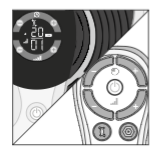
k Ensure you familiarise yourself with the feeling of Electrical Muscle Stimulation (EMS). Use on a low intensity for 20 minutes once per day for a few days.
Set the intensity at a level where you can feel the stimulation in your feet which creates a calf contraction. This will likely be less than intensity 40.
It is normal to feel tingling or varying sensations in your muscles you are treating. l After a few days of familiarisation, use a higher intensity that provides you with strong but comfortable muscle contractions. Most people experience a strong contraction at intensity level 40 or over. You can set the intensity between 1-99.
Please note that the intensity required may vary from day to day.
If you feel pain or discomfort:
• lower the intensity of the Arthritis Pads using either the (–) Intensity Control on the control panel of the device or on the remote control.
• You can also choose to stop therapy before the end of the 20 minute session to avoid muscle fatigue. You can do this by pressing the power button on the device or on the remote control.
m The time control/display will start to count down in minutes as Revitive cycles through its program.
n When Revitive times out, the time display reads 00 and you will hear three beeps.
o Revitive switches itself off automatically.
p Ensuring that the device has switched itself off, then gently peel the Arthritis Pads from the skin. Do not pull the Arthritis Pads off the skin using the Electrode cords as this may damage the cords.
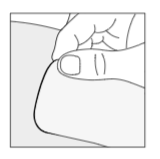
q Replace the Arthritis Pads onto their plastic liner after use.rUnplug the Electrode cord from the opening on Revitive.
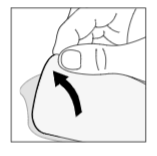
r Unplug the Electrode cord from the opening on Revitive.
a Select the area you wish to apply electrical stimulation to.
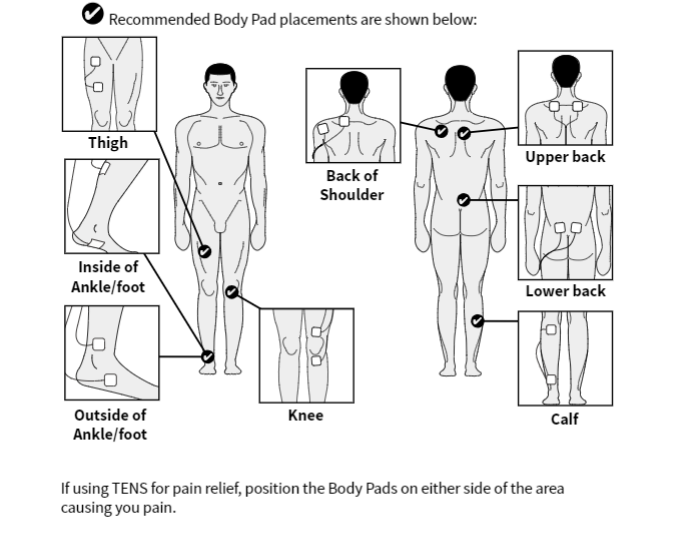
If using TENS for pain relief, position the Body Pads on either side of the area causing you pain.
Do NOT use the Body Pads on your head, face, neck or chest.
b Clean and dry the area where you will place the Body Pads.
c Make sure Revitive is switched off. If the control panel is still illuminated, press the power button and turn Revitive off.
d Attach the ends of the Body Pads to the Electrode cord.
Press connectors until there is no gap between them. Leaving a gap may cause discomfort.
e Plug the other end of the Electrode cord into the opening on the side of Revitive.
Plugging in the Electrode cord will automatically turn the foot-pads off.
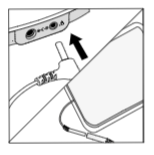
f Remove the plastic liner from the Body Pads, by peeling it off carefully. Replace the Body Pads onto the plastic liner after use.
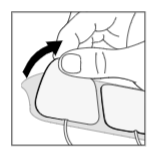
g Press the Body Pads on the area you wish to apply electrical stimulation, as shown on page 29, gently pressing the adhesive side against the skin.

h Press the power button on the device or on the remote control to turn Revitive on.
You will hear a beep and the display lights will light up. The time will read 30 minutes, the Intensity will read 00 and the EMS symbol will be displayed. NB Revitive Body Pads will automatically provide stimulation in EMS mode.
See page 23 for instructions on how to use EMS mode.
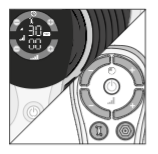
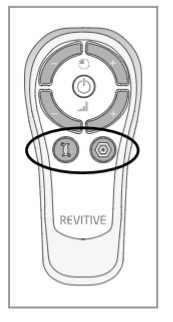
i Press the TENS button on the remote control. You will then see the TENS symbol on the display.
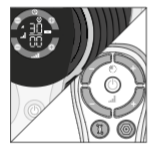
j Press the (+) Intensity Control once to start stimulation.
Continue to increase the intensity until you feel a strong but comfortable tingling sensation without it causing you pain. You can set the intensity between 1-99.
You can use the buttons on the device or remote control.
Press the (+) button to increase the level.
Press the (–) button to decrease the level.
If you feel pain or discomfort:
• Lower the intensity of the Body Pads using the (–) Intensity Control on the device or remote control.
• You can also choose to stop therapy before the end of the 30 minute session to avoid skin irritation. You can do this by pressing the power button on the device or on the remote control.
k The Time display will start to count down in minutes as Revitive cycles through its program.
When Revitive times out, you will hear three beeps, and the device will switch itself off automatically.
l Ensuring that the device has switched itself off, then gently peel the Body Pads from the skin.
Do not pull the Body Pads off the skin using the Electrode cords as this may damage the cords.
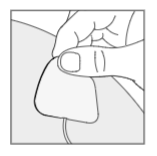
m Replace the Body Pads onto their plastic liner after use.

n Unplug the Electrode cord from the opening on Revitive.

To change between EMS and TENS mode, press the button of the stimulation mode you require on the remote control.
During use, switching from EMS to TENS mode (or vice versa), will reset the timer back to 30 minutes. The intensity will also be reset to zero.
Revitive can be powered from either the rechargeable battery or by connecting it to an electrical socket.
a Locate the AC/DC power adaptor.
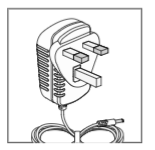
b Plug the small end of the power cord into the opening on the side of the Revitive.

